Dubai 4D Full Body VR Experience in Al Quoz
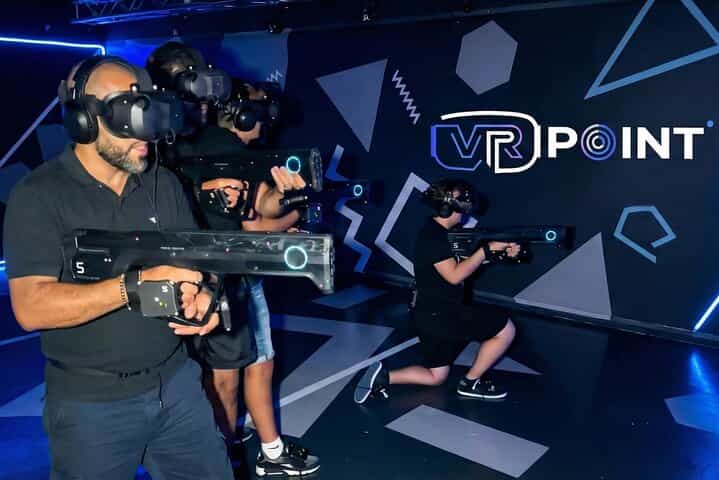
Private 4D full-body VR session in a 100 m² free-roam arena in Al Quoz. Your group (2–5 players) will be guided by a dedicated VR host, fitted with full-body tracking equipment, and experience wind, heat and scent effects. Total session time ≈ 60 minutes (including briefing, fitting and cooldown).
In Collaboration with VR Point. Updated on February 26, 2026.
This itinerary was created in collaboration with VR Point, inspired by the tour Dubai 4D Full Body VR Experience in Al Quoz. Please check the tour information during your booking process.
Highlights
- 100 m² free-roam VR arena
- Full-body tracking with visible limbs and movement
- 4D sensory effects: wind, heat and scent
- Private sessions for groups of 2–5 with a dedicated game master
- Gameplay 25–30 minutes plus briefing, fitting and cooldown
Explore all itineraries in United Arab Emirates.
Itinerary
Day 1
Arrival at VR POINT in Al Quoz. Recommended session start chosen: 15:00. Schedule shown is for a 15:00 session with a 14:50 arrival (10 minutes before session start) so check-in and fitting complete within ~60 minutes.
Welcome & Check-in
Staff greet your group, confirm booking and guide you to the lounge while preparations begin.
Tips from local experts:
- Arrive 10–15 minutes before your booked session time to allow for check-in and quick safety briefing.
- Bring a printed or digital booking confirmation to speed up check-in if available.
- If anyone in your group has medical concerns (e.g., epilepsy, recent neck/back issues), inform staff at check-in.
Loading Area – Lounge & Pre-Game Setup (10–15 min)
Relax on leather sofas and use the PlayStation 5 while staff prepare your session. A menu is available for signature hot & cold drinks and snacks (available to purchase).
Tips from local experts:
- Use this short waiting period to finalize which game mode your group prefers (zombie, adventure, PVP).
- If you plan to purchase drinks/snacks, have small change or card ready; the lounge serves hot and cold items.
- Keep personal belongings close; pockets and small bags are easiest to manage before gearing up.
Digital Form & Safety Confirmation (Tablet)
Complete a short digital safety and terms form on a tablet with staff guidance; required for participation and to save game results.
Tips from local experts:
- Have basic ID details ready for the digital form to speed completion (name and contact).
- Read the safety notes carefully and ask staff if any instructions are unclear.
- Completion typically takes only a few minutes — one person can assist younger players if needed.
Full-Body Gear Up & Sensor Setup
Staff assist each player to suit up with full-body sensors and VR headset, ensuring comfortable fit and calibrated tracking.
Tips from local experts:
- Wear comfortable, flexible clothing and closed-toe shoes to allow full movement during the session.
- Remove large jewelry, hats, or loose accessories that could interfere with sensors or movement.
- If you wear glasses, tell the staff — most headsets accommodate glasses but staff will ensure a comfortable fit.
Enter the Arena – 100 m² Free-Roam VR
Final instructions and safety reminders before entering the 100 m² free-roam arena.
Tips from local experts:
- Listen closely to the final safety instructions; they include arena boundaries and emergency stops.
- Keep movement controlled and be aware of teammates’ positions to avoid collisions in tight moments.
- If anyone feels unwell during the briefing, notify the operator immediately — sessions can be paused.
VR Mission – Immersive Gameplay (25–30 min)
Live gameplay with voice support from the dedicated game master. Typical run time 25–30 minutes depending on group pace.
Tips from local experts:
- Choose a game mode that fits your group's energy — cooperative missions encourage teamwork, PVP suits competitive groups.
- Operators remain on voice to assist; signal them immediately if you need help or want to stop.
- Stay hydrated before entering; gameplay is active and can be physically demanding for some players.
Group Photo (On Your Device)
Staff will assist with a group photo on your phone. VR Point does not store customer photos.
Tips from local experts:
- Have one device prepared and unlocked so staff can help take the group photo quickly.
- Wipe your camera lens beforehand for the clearest shot after sweaty gameplay.
- If you prefer not to be photographed, inform staff and they will skip this step.
Cooldown Zone – Stats & Relax
View game statistics on a large screen, debrief with your team and enjoy a short cooldown. Drinks and snacks are available for purchase.
Tips from local experts:
- Take a few minutes to stretch and recover after active gameplay, especially if players felt dizzy or lightheaded.
- Check the on-screen stats to compare performances and decide on any repeat-play preferences.
- If you want extra playtime, speak to staff here — additional rounds may be offered subject to availability (onsite).
Itinerary Attributes
| Days | 1 |
| Highlights | 5 |
| Season | - |
| Month | - |
| Persona | Friends |
| Transfers | - |
| Restaurants | - |
| Total Activities | 8 |
| Total Places | 8 |
| Activities Types | Experience, Break |